Summary
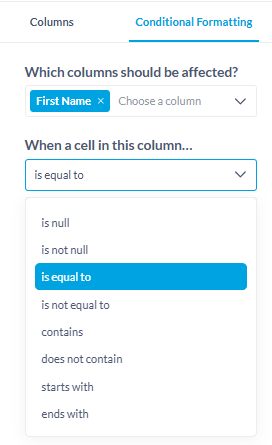
Metabase’s current conditional formatting options are very limited. Users can only apply formatting using simple, pre-defined comparisons (e.g., “is equal to”, “contains”, “is null”).
Unlike other BI tools, Metabase does not allow conditional formatting based on custom logical expressions or formulas.
This restricts users from building data-driven visual cues that reflect complex business logic, which is particularly important in calculated or dynamic datasets.
Current Limitation
As of now, conditional formatting:
-
Must be applied through a dropdown of basic operators (
is equal to,contains, etc.). -
Can only reference a single field.
-
Cannot use computed or cross-column logic.
-
Cannot incorporate custom expressions, formulas, or aggregation-based logic.
-
Does not allow referencing other cells, fields, or rows dynamically.
This results in a rigid UX that doesn’t meet analytical or reporting needs for complex dashboards.
Proposed Solution
Add support for custom expressions in conditional formatting, allowing users to define logic using Metabase’s expression syntax (the same one used in “Custom Columns” or “Filters”).
- The expression editor should support:
-
Column references (
[Column Name]) -
Comparison operators (
>,<,=,!=) -
Logical operators (
AND,OR,NOT) -
Functions (e.g.,
sum(),avg(),abs(), etc.) -
Case/conditional logic (
CASE WHEN ... THEN ... END)
-
- Optionally, provide a preview of which cells/rows the expression affects.
Example Use Cases
1. Compare columns dynamically: Highlight rows where actual values exceed targets
[Actual] > [Target]
2. Flag performance thresholds: Color-code revenue growth based on percentage change
([Current Revenue] - [Previous Revenue]) / [Previous Revenue] > 0.15
3. Multi-condition formatting: Highlight rows that meet multiple criteria
([Status] = "Active") AND ([Utilization] < 0.5)
4. Conditional formatting by rank or percentile
[Score] > percentile([Score], 90)
5. Benchmark comparison using constants or calculated references
[Conversion Rate] > 1.1 * avg([Conversion Rate])
Would love to see Metabase reach feature parity with other BI tools for some of these essential items.