Technical Report: Challenges in Time-Period Comparisons and Filter Linking in Metabase
Issue 1: Time Comparison Incompatibility with Text/Category Filters
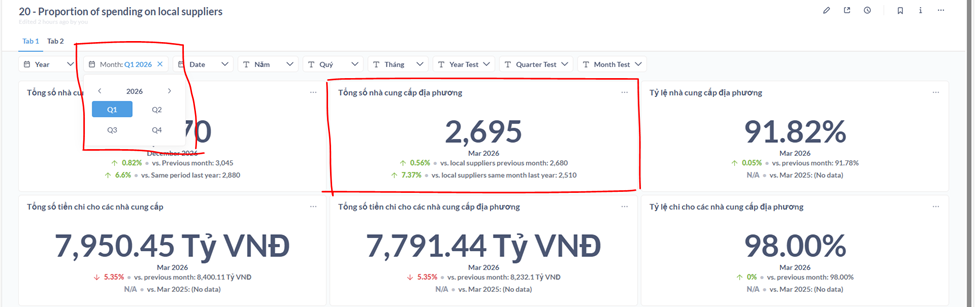
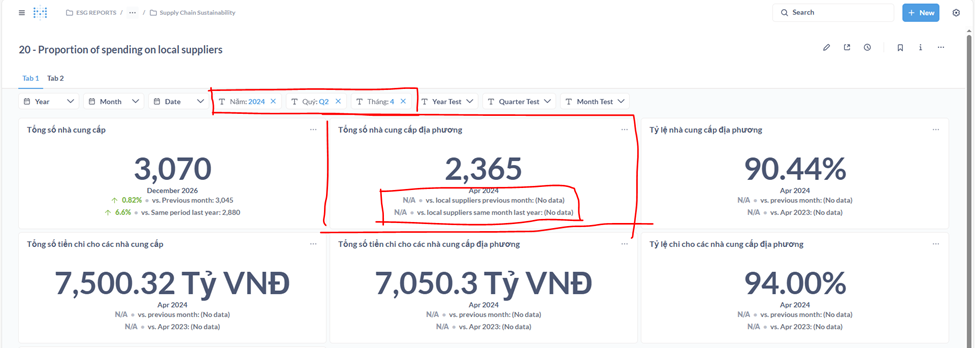
Description: Trend Charts correctly display "vs. Previous Month" or "vs. Previous Year" when no filters are applied or when only a "Year" filter is used. However, when more granular filters (e.g., Year + Month) are applied, the comparison functionality breaks.
Root Cause: Based on community research (Metabase Issue #57225), Metabase lacks an underlying data-fetching layer to automatically retrieve the required offset period. If a filter is set to "January 2025," Metabase only queries that specific data slice. To compare it to January 2024, the query would need to include data from both periods, which the standard filter prevents.
Attempted Solution: Using the Offset function in Metabase (e.g., Offset -1 for the previous month, Offset -12 for the previous year).
-
Limitation: This only works with Date Picker filters. Date Pickers do not allow for separate Year/Quarter/Month selections; they require a specific date range.
-
Result: You cannot link a "Year-Quarter" filter to a "Year-Month" filter. For example, selecting "Q1 2024" will not restrict the month filter to show only January, February, and March.
Issue 2: Injecting Filters into SQL (Manual Comparison)
Action: To force the comparison logic to work, filters were injected directly into raw SQL variables.
Steps Taken:
-
Created and inserted filter parameters directly into the SQL code.
-
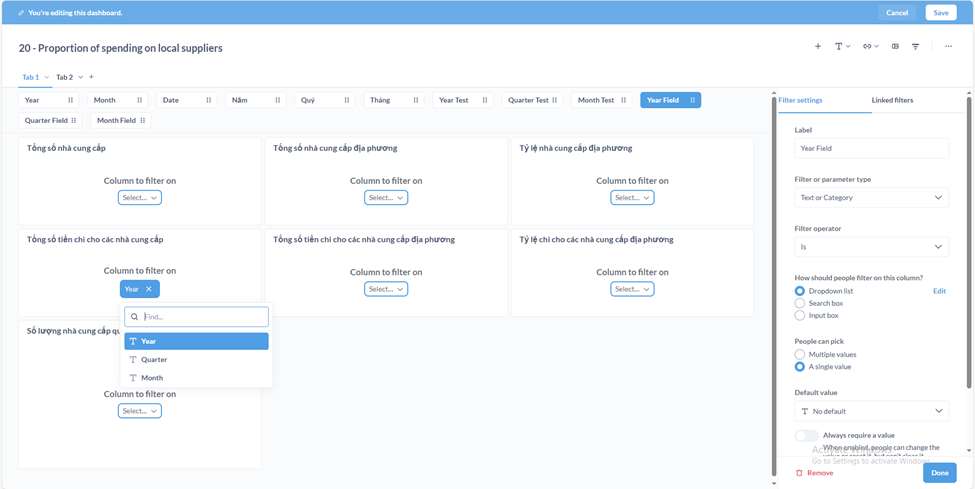
Configured the filter settings in the right-hand sidebar.
-
Mapped data fields to each filter (Year, Quarter, Month).
-
Mapped these filters to the corresponding charts on the Dashboard.
Result: The charts successfully filter by Year, Quarter, and Month. However, these filters act independently. They lack "Cascading/Linked" logic (e.g., selecting Q3 does not limit the "Month" filter to months 7, 8, and 9).
Issue 3: Using "Field Filters" for Linked Logic
Action: Switching from Text/Category variables to Field Filters in SQL to enable cascading logic.
Steps Taken:
-
Rewrote the SQL to use
{{field_filter}}syntax. -
Created Year, Quarter, and Month filters.
-
Integrated comparison logic directly into the SQL query.
-
Linked the filters (Quarter dependent on Year, Month dependent on Quarter).
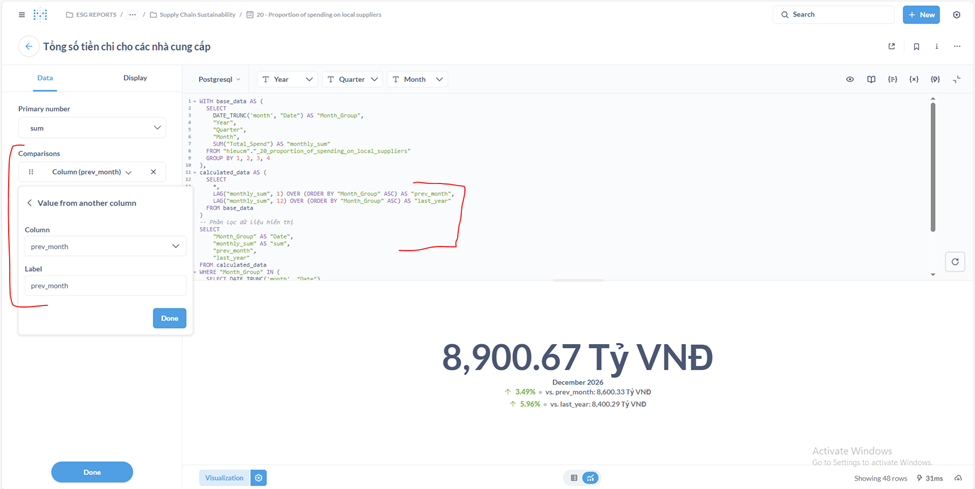
Result: The comparison now works with filters, and the filters are logically linked.
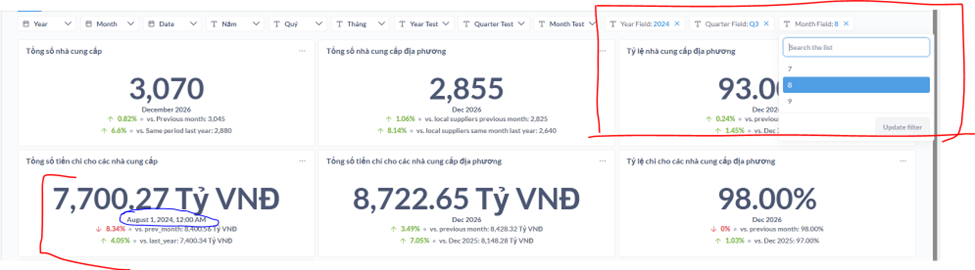
- Remaining Issue: UI display anomalies (e.g., "August 1, 2024, 12:00 AM" showing up in the legend/axis), likely due to how Metabase handles date formatting from SQL outputs.
Summary & Analysis
Currently, a workaround has been found to make comparisons work with filters, but it comes with significant trade-offs:
-
Loss of No-Code Capabilities: Moving logic to SQL means you can no longer use the "Question" (Drag-and-Drop) interface. Every metric must be manually coded.
-
Maintenance Effort: Complexity increases significantly. Any change to a metric requires manual SQL updates across all related queries.
-
Performance & Architecture: It remains unclear how this approach affects performance or how it will scale with real-world production data (current tests use a flat mockup table).
-
ETL Implications: This logic might be better handled at the ETL/Data Modeling layer rather than the Visualization layer.
Seeking Advice: Are there more efficient alternatives that preserve the "Question" GUI while maintaining hierarchical time-comparison filters?