A New Approach in Metabase - Moving Beyond Fixed Lists
Data visualization tools often provide powerful analytical capabilities; however, when it comes to user experience, some assumptions can be limiting. Filters are one of them. In most BI tools, filters appear in a fixed location, with a predefined design, and are typically list-based components. But do filters really have to be this way?
In this article, we discuss a more flexible and UI-aligned approach by moving the filtering experience to the application layer, based on a development we implemented in Metabase.
The Filter Problem Encountered During Embedding
One of the main issues we encountered during the Metabase embedding process was that the default filter components — both in terms of placement and design — were not suitable for every application. In embedded dashboards, filters are positioned in a fixed area and often do not visually align with the application’s own design language.
When we chose not to embed the entire dashboard and instead included only the necessary visualizations within the application, another issue emerged: each visualization had its own filter, and it was not possible to control multiple visualizations — or the entire dashboard — with a single filter.
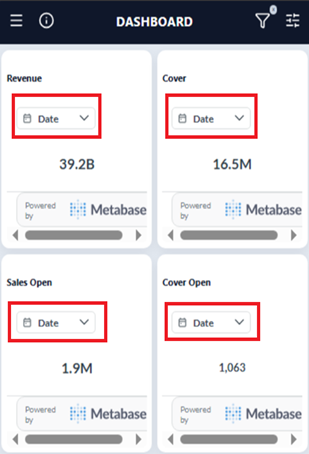
More importantly, beyond this default structure provided by Metabase, there was no alternative filtering option available. This made the filtering experience entirely dependent on the Metabase interface.
Moving Filter Control to the Application Layer
At this point, the idea of moving filter control to the application side came to the forefront. The approach was straightforward:
• Filter components are designed within the application’s own UI instead of Metabase.
• Users interact with familiar buttons and selection fields.
• The selected values are sent to Metabase as parameters during embedding.
With this structure, Metabase’s querying power is preserved, while the user interface becomes fully aligned with the application’s design language.
Dynamic and Secure Filtering with SQL Parameters
In the Metabase embedding process, SQL parameters are fundamental building blocks that enable dashboards to operate dynamically and in a controlled manner. These parameters, defined within native SQL queries, allow the query to be re-executed based on externally provided values.
Through parameters such as:
           •             {{currency}}

           •             {{bdate}}

           •             {{brand}}
multiple scenarios can be managed with a single SQL query. This eliminates the need to duplicate the same query for different requirements, significantly reducing maintenance costs.
Dynamic Calculations and Optional Filters
The {{currency}} parameter allows users to select a currency. Based on the selected value, the relevant sales column is calculated within a CASE WHEN structure.
On the other hand, structures such as:
           •             \[\[AND {{bdate}}\]\]

           •             \[\[AND BRAND = {{brand}}\]\]
are optional filters. When users provide values for these filters, the relevant SQL fragment is automatically added to the query. When left empty, the query structure remains unaffected. This allows a single query to be used in a flexible and secure manner.
(
  SELECT
    BRAND,
    CASE WHEN {{currency}} = 'EUR' THEN SUM(SALES_EUR)
         WHEN {{currency}} = 'USD' THEN SUM(SALES_USD)
         ELSE SUM(SALES)
    END AS "CASE1"
  FROM
    "DHR_ODS"."METABASE_TEST_DATA"
  WHERE
    1 = 1 [[AND {{bdate}}]]
  GROUP BY
    CURRENCY,
    BRAND
)
Passing Parameters via the Embed URL
In a simple embed scenario, parameters can be passed directly to Metabase through the URL:
https://metabase.example.com/embed/question/abc123#currency=EUR&brand=Starbucks
On the frontend side, this flow progresses by dynamically generating the embed URL according to the user’s selections. When a user makes a selection, the embedded content reloads in the background with the new parameters.
For example:
function buildEmbedUrl({ currency, brand }) {
const base = "https://metabase.example.com/embed/question/abc123";
const params = new URLSearchParams({
currency: currency ?? "",
brand: brand ?? ""
});
return `${base}#${params.toString()}`;
}
// Örnek kullanım
const url = buildEmbedUrl({
currency: "USD",
brand: "McDonalds"
});
iframe.src = url;
In scenarios where signed embedding is used, the logic remains the same. This time, values such as currency and brand are sent to Metabase via the params field of the JWT token generated on the backend. Filter control remains entirely on the application side.

Conclusion: A More Flexible and More Aligned Experience
With this approach, the filtering logic is placed entirely under the control of the application. Users interact only with components that match the application’s own design, while on the Metabase side, the same SQL query is re-executed based on the provided parameters.
As a result:
• Multiple scenarios are managed with a single SQL query.
• UI/UX becomes fully application-specific.
• The powerful querying infrastructure of Metabase is preserved.
In short, we have seen that filters do not have to be limited to fixed lists; with the right approach, a much more flexible and user-friendly experience can be achieved.