I am facing an issue where a few tables from my Postgres database are not appearing in the dropdown list when creating a Native Query or when browsing through the Data > Databases section in Metabase.
Details:
These tables do appear under Admin > Table Metadata, but they are displayed in a greyed-out state.
The unhide eye icon is not available for these tables, so they cannot be unhidden.
Despite this, I am able to query these tables successfully by manually typing the table name in the Native Query editor (auto-population suggestions does not appear the table names when typing).
This confirms that permissions and database access are correct.
The issue only affects their visibility in the dropdown/search list of tables or when query auto-population does not displays these tables.
What I’ve Verified:
Permissions on the database and schema are correctly set.
Metabase sync and scan have been executed.
Other tables in the same schema are visible and selectable without issues.
Tried using different browser(safari) than normal brave browser as well, issue persists.
What does the greyed-out state in Table Metadata actually imply?
Why would a tables be queryable but still excluded from dropdown selections?
Additional Experiment Performed:
To understand Metabase’s behavior, I performed a test:
I manually hid a different table from the Table Metadata section (same DB and schema).
This test table turned greyed out, but with an “unhide” eye icon visible in front of it.
I asked another admin user to unhide this test table, and they were able to unhide it successfully.
This confirms:
Greyed-out tables normally should show an unhide icon,
And that other admins can reverse the hide action.
However, the problematic tables are greyed out but show no unhide icon.
I have referred following document as well for debugging and resolution purpose
If you run a sync and check the Metabase log, are there any error messages or exceptions logged when the table that is greyed out is scanned?
What Metabase version are you running?
Is the table in question in a schema other than public?
Try starting a new SQL question, select the database containing the table, and run this query, replacing greyed_out_tablename with the name of the table:
SELECT 1 from greyed_out_tablename;
You should get a table back with the number 1 in it. If you get anything else, there’s an access problem with the table. Ideally you get an exception that explains why, but if the table is actually a view and doesn’t like the query, you might get something else. Metabase uses a query like this to ascertain table reachability; if the query fails, it considers the table inaccessible.
Another thing to try is running this query:
SELECT * FROM information_schema WHERE table_name='greyed_out_tablename';
If the table_type field is something other than BASE TABLE (especially FOREIGN) that could also indicate a special situation with the table. It is also interesting if you get more than one row back; it means the same table name appears in multiple schemas. This goes back to my question earlier about if the table in question is in another schema than public.
There are no errors or exceptions logged during the sync process.
2. Metabase version
Metabase v0.57.3
3. Schema information
All affected tables are in the public schema of the same database.
Additionally, the same table names exist across multiple database instances added in Metabase.
4. Reachability test (SELECT 1 FROM greyed_out_tablename)
Running the query:
SELECT 1 FROM greyed_out_tablename;
returns 1 as expected.
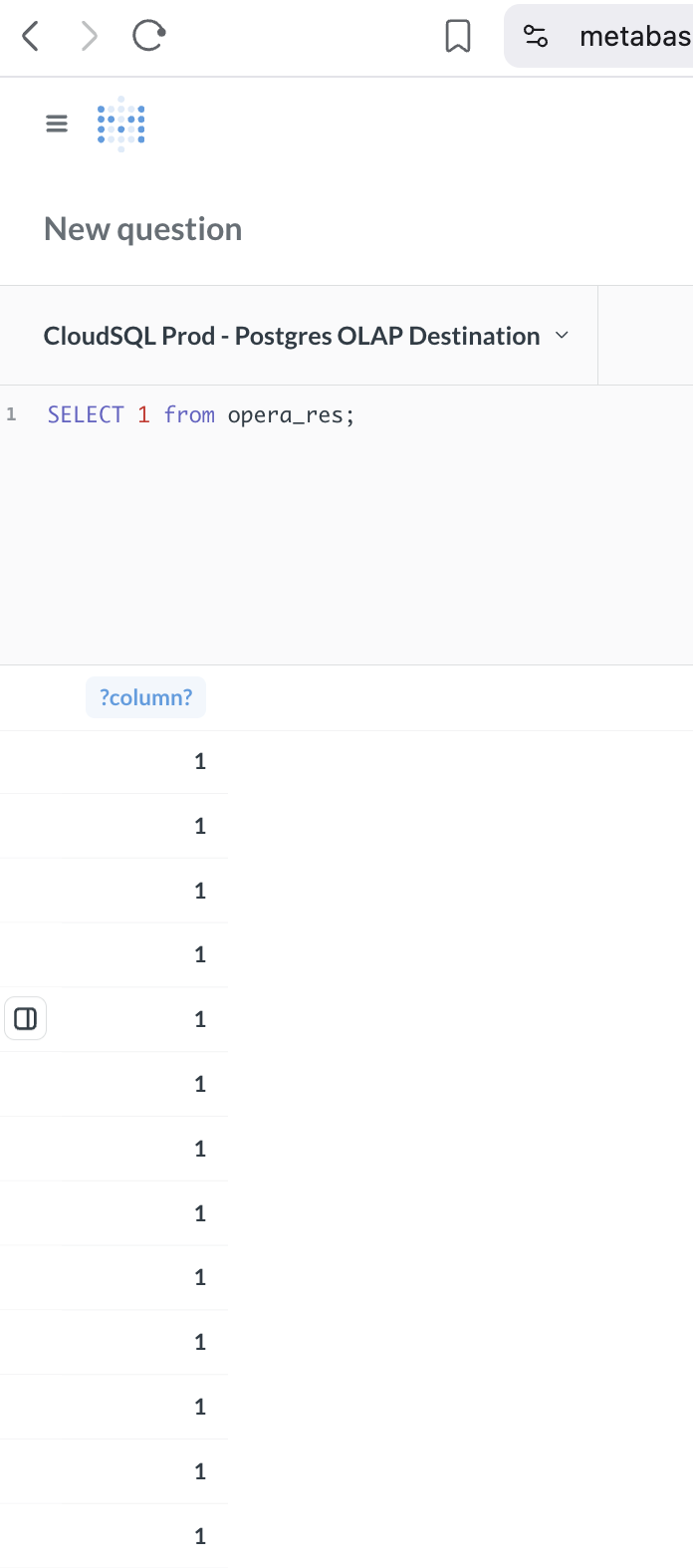
However, when I export/open the result file, I see 1 repeated 1,048,576 times (1048576 rows). Attached screenshot
5. Checking table type in information_schema
Query used (corrected):
SELECT *
FROM information_schema.tables
WHERE table_name = 'greyed_out_tablename';
The table appears only once — no duplicates across schemas.
table_type returned is BASE TABLE.
This confirms it is a regular table—not a view, not foreign, not materialized.