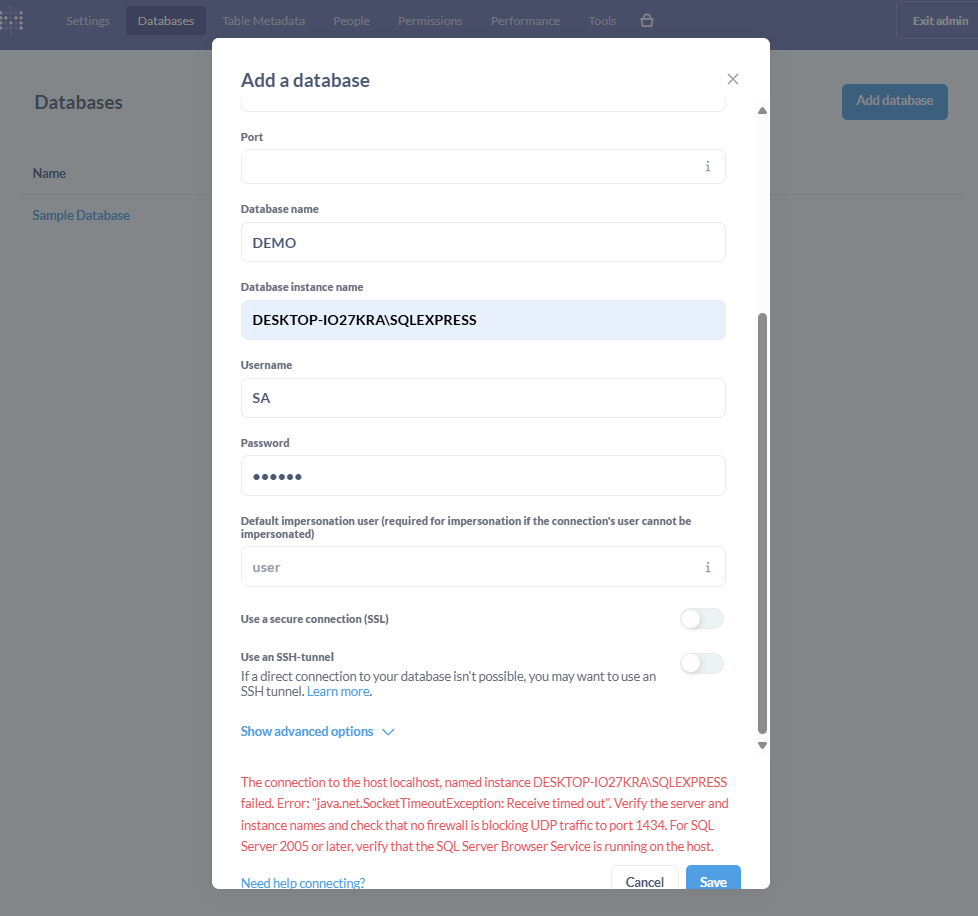
Hi I already configure everything on my desktop, can I know whether i miss any steps. anything can solve this issue?
Make sure you have added an exception to Windows Firewall to allow access to the port.
I already add rule in Inbound Rules but also cannot connect.
Is the database engine running on your local machine? Can you connect to it with a tool like Azure Data Studio?
I only have MSSQL and Oracle run locally in my machine. Since I just want to test out metabase for clients so, all run locally.
Try port 1433.
Check in the instance settings for what port it was allocated.
Alright already solved. I running i docker container so the host and port name have to be same in docker container. Thank you for responding 
Ah yes, that will change things quite a lot! Glad you got it worked out.
Please mark an answer as a Solution so we know your question was answered. Thanks!
1 Like
This topic was automatically closed 3 days after the last reply. New replies are no longer allowed.