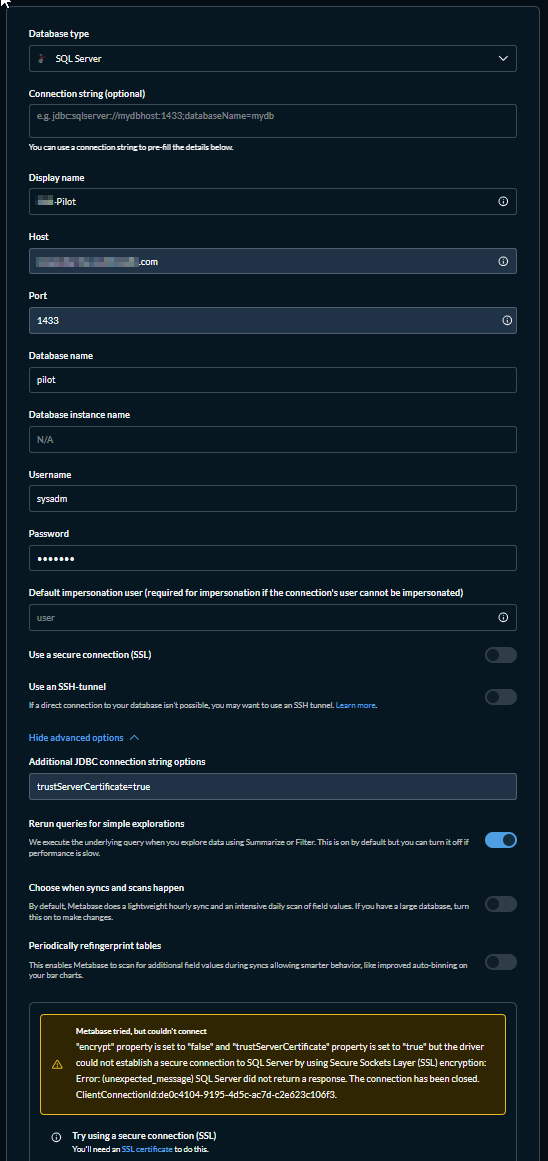
We’ve been testing a little bit with metabase on-prem (java executable), and I had an older version setup at least 6 months ago connected to our MS SQL server. Everything was working and we could see data fine.
It’s been a bit, so I thought I’d update it and try a few more tests with it (updated and also updated Java 21 as the new version required it). Now we can’t seem to connect to our db server. I setup a new instance with the newest version and still get the same error on our connection.
Metabase tried, but couldn't connect
"encrypt" property is set to "false" and "trustServerCertificate" property is set to "false" but the driver could not establish a secure connection to SQL Server by using Secure Sockets Layer (SSL) encryption: Error: (unexpected_message) SQL Server did not return a response. The connection has been closed. ClientConnectionId:809c6457-b614-4e21-be5a-c3e0ac3d5848.
I’ve tried both suggested fixes, but nothing seems to work. I also don’t see the server even trying to connect to the SQL server (event logs not showing anything).
Is this a bug or has something changed with MS SQL connections?
Are you passing anything in the Additional JDBC connection string? I think you can probably fix it by adding trustServerCertificate=true to the Additional JDBC connection string options in your database settings.
"encrypt" property is set to "false" and "trustServerCertificate" property is set to "true" but the driver could not establish a secure connection to SQL Server by using Secure Sockets Layer (SSL) encryption: Error: (unexpected_message) SQL Server did not return a response. The connection has been closed.
No go. I’m not even sure if it’s trying to connect, this error comes up really fast. I took a quick look at the SQL logs and don’t see anything specific to the metabase server.
On the terminal it shows the errors are in ‘driver.util’ and ‘warehouses-rest.api’ - Cannot connect to Database. And then the same error as above with all the java details.
Here’s the driver.util info if it helps:
2026-03-03 15:39:16,284 ERROR driver.util :: Failed to connect to Database
com.microsoft.sqlserver.jdbc.SQLServerException: "encrypt" property is set to "true" and "trustServerCertificate" property is set to "true" but the driver could not establish a secure connection to SQL Server by using Secure
Sockets Layer (SSL) encryption: Error: (unexpected_message) SQL Server did not return a response. The connection has been closed. ClientConnectionId:b6134c55-3e4a-46fa-9705-5ad670de77dd.
at com.microsoft.sqlserver.jdbc.SQLServerConnection.terminate(SQLServerConnection.java:4708)
at com.microsoft.sqlserver.jdbc.TDSChannel.enableSSL(IOBuffer.java:1983)
at com.microsoft.sqlserver.jdbc.SQLServerConnection.connectHelper(SQLServerConnection.java:4230)
at com.microsoft.sqlserver.jdbc.SQLServerConnection.login(SQLServerConnection.java:3817)
at com.microsoft.sqlserver.jdbc.SQLServerConnection.connectInternal(SQLServerConnection.java:3591)
at com.microsoft.sqlserver.jdbc.SQLServerConnection.connect(SQLServerConnection.java:2286)
at com.microsoft.sqlserver.jdbc.SQLServerDriver.connect(SQLServerDriver.java:1371)
at metabase.plugins.jdbc_proxy$proxy_driver$reify__101767.connect(jdbc_proxy.clj:37)
at java.sql/java.sql.DriverManager.getConnection(DriverManager.java:683)
at java.sql/java.sql.DriverManager.getConnection(DriverManager.java:191)
at clojure.java.jdbc$get_driver_connection.invokeStatic(jdbc.clj:271)
at clojure.java.jdbc$get_driver_connection.invoke(jdbc.clj:250)
at clojure.java.jdbc$get_connection.invokeStatic(jdbc.clj:411)
at clojure.java.jdbc$get_connection.invoke(jdbc.clj:274)
at clojure.java.jdbc$db_query_with_resultset_STAR_.invokeStatic(jdbc.clj:1111)
at clojure.java.jdbc$db_query_with_resultset_STAR_.invoke(jdbc.clj:1093)
at clojure.java.jdbc$query.invokeStatic(jdbc.clj:1182)
at clojure.java.jdbc$query.invoke(jdbc.clj:1144)
at clojure.java.jdbc$query.invokeStatic(jdbc.clj:1160)
at clojure.java.jdbc$query.invoke(jdbc.clj:1144)
at metabase.driver.sql_jdbc.connection$can_connect_with_spec_QMARK_.invokeStatic(connection.clj:370)
at metabase.driver.sql_jdbc.connection$can_connect_with_spec_QMARK_.invoke(connection.clj:367)
at metabase.driver.sql_jdbc.connection$can_connect_QMARK_$fn__95835.invoke(connection.clj:380)
at metabase.driver.sql_jdbc.connection$do_with_connection_spec_for_testing_connection$fn__95817.invoke(connection.clj:355)
at metabase.driver.sql_jdbc.connection.ssh_tunnel$do_with_ssh_tunnel.invokeStatic(ssh_tunnel.clj:153)
at metabase.driver.sql_jdbc.connection.ssh_tunnel$do_with_ssh_tunnel.invoke(ssh_tunnel.clj:142)
at metabase.driver.sql_jdbc.connection$do_with_connection_spec_for_testing_connection.invokeStatic(connection.clj:350)
at metabase.driver.sql_jdbc.connection$do_with_connection_spec_for_testing_connection.invoke(connection.clj:346)
at metabase.driver.sql_jdbc.connection$can_connect_QMARK_.invokeStatic(connection.clj:378)
at metabase.driver.sql_jdbc.connection$can_connect_QMARK_.invoke(connection.clj:374)
at metabase.driver.sql_jdbc$fn__99249.invokeStatic(sql_jdbc.clj:56)
at metabase.driver.sql_jdbc$fn__99249.invoke(sql_jdbc.clj:54)
at clojure.lang.MultiFn.invoke(MultiFn.java:234)
at metabase.driver.util$can_connect_with_details_QMARK_$fn__60771.invoke(util.clj:136)
at clojure.core$binding_conveyor_fn$fn__5844.invoke(core.clj:2047)
at clojure.lang.AFn.call(AFn.java:18)
at java.base/java.util.concurrent.FutureTask.run(FutureTask.java:317)
at java.base/java.util.concurrent.ThreadPoolExecutor.runWorker(ThreadPoolExecutor.java:1144)
at java.base/java.util.concurrent.ThreadPoolExecutor$Worker.run(ThreadPoolExecutor.java:642)
at java.base/java.lang.Thread.run(Thread.java:1583)
Caused by: javax.net.ssl.SSLException: (unexpected_message) SQL Server did not return a response. The connection has been closed. ClientConnectionId:b6134c55-3e4a-46fa-9705-5ad670de77dd
at java.base/sun.security.ssl.Alert.createSSLException(Alert.java:126)
at java.base/sun.security.ssl.TransportContext.fatal(TransportContext.java:383)
at java.base/sun.security.ssl.TransportContext.fatal(TransportContext.java:326)
at java.base/sun.security.ssl.TransportContext.fatal(TransportContext.java:321)
at java.base/sun.security.ssl.SSLTransport.decode(SSLTransport.java:145)
at java.base/sun.security.ssl.SSLSocketImpl.decode(SSLSocketImpl.java:1506)
at java.base/sun.security.ssl.SSLSocketImpl.readHandshakeRecord(SSLSocketImpl.java:1421)
at java.base/sun.security.ssl.SSLSocketImpl.startHandshake(SSLSocketImpl.java:455)
at java.base/sun.security.ssl.SSLSocketImpl.startHandshake(SSLSocketImpl.java:426)
at com.microsoft.sqlserver.jdbc.TDSChannel.enableSSL(IOBuffer.java:1872)
... 38 more
Caused by: java.io.IOException: SQL Server did not return a response. The connection has been closed. ClientConnectionId:b6134c55-3e4a-46fa-9705-5ad670de77dd
at com.microsoft.sqlserver.jdbc.TDSChannel$SSLHandshakeInputStream.ensureSSLPayload(IOBuffer.java:910)
at com.microsoft.sqlserver.jdbc.TDSChannel$SSLHandshakeInputStream.readInternal(IOBuffer.java:964)
at com.microsoft.sqlserver.jdbc.TDSChannel$SSLHandshakeInputStream.read(IOBuffer.java:957)
at com.microsoft.sqlserver.jdbc.TDSChannel$ProxyInputStream.readInternal(IOBuffer.java:1221)
at com.microsoft.sqlserver.jdbc.TDSChannel$ProxyInputStream.read(IOBuffer.java:1207)
at java.base/sun.security.ssl.SSLSocketInputRecord.read(SSLSocketInputRecord.java:489)
at java.base/sun.security.ssl.SSLSocketInputRecord.readHeader(SSLSocketInputRecord.java:483)
at java.base/sun.security.ssl.SSLSocketInputRecord.decode(SSLSocketInputRecord.java:160)
at java.base/sun.security.ssl.SSLTransport.decode(SSLTransport.java:111)
... 43 more
I did try that as well originally. Same error based on settings:
Metabase tried, but couldn't connect
"encrypt" property is set to "true" and "trustServerCertificate" property is set to "true" but the driver could not establish a secure connection to SQL Server by using Secure Sockets Layer (SSL) encryption: Error: (unexpected_message) SQL Server did not return a response. The connection has been closed.
Currently for testing, the folder setup is in /opt/metabase02 and the .jar file is running as root. All the folders seem to have populated information correctly on first launch(i.e. plugins folder) and the .jar files for them are existing. Sample data loaded fine as well.
I don’t even see any attempted connections in the SQL event logs. I’ve confirmed firewalls aren’t in the way on both servers. SQL server is definitely listening on the default port ( we have dozens of clients using the server).
Could it be the plugin with this release? Anyone else having issues?
Going to see if I can connect to a different server - as soon as I find other login details…
When leaving the port field empty, I’d get this as well:
Metabase tried, but couldn't connect
The connection to the host (server), named instance failed. Error: "java.net.SocketTimeoutException: Receive timed out". Verify the server and instance names and check that no firewall is blocking UDP traffic to port 1434. For SQL Server 2005 or later, verify that the SQL Server Browser Service is running on the host.
Working on getting a test SQL Server 2016 instance going … need to fire up the old Windows box for the first time in a few months…
While that’s working, tell us about your setup. Can you post the diagnostic info from Admin → Tools? Are you running Metabase in a container (docker, etc.)?
EDIT: UPDATE: I successfully connected to a MS SQL Server 2016 instance with a local Metabase installation on my Windows 10 workstation. Setting up a Metabase instance on my Mac now to verify things are working across a network.
UPDATE 2: Working fine over a network. Recheck that the port number is correct, it can move around; also make sure connections over TCP/IP are enabled in Configuration Manager, especially under the client 64-bit settings. If this is a long-lived SQL Server you might check that the certificate hasn’t expired.
Yeah I don’t get what’s up. This sql server is used a lot and nothing has changed - all the other apps that connect to it are fine. Prior to update of metabase, everything was working.
I updated metabase, tried running it and got an error about java. I realized it wanted a newer version of java, so I updated to v21 using ‘openjdk-21-jdk’ via console. Ran again and it was starting up fine except for the issue. I noticed too that the recommended version of java was the temurin one, so I switched to that just in case. Confirmed the correct version was running and defaulting via ‘update-alternatives’.
Maybe I’ve bricked this server due to either running the .jar with the Java 11 or perhaps the Openjdk version did something.
I’m going to rebuild the metabase server (OS) since it’s pretty quick and try from there.
FYI - I’m a new member to the forum, so I can only post so much a day (was blocked for a day. ).
If you don’t have any 3rd party plugins installed, try deleting the plugins folder and restarting Metabase, that will purge any leftovers and load it with up-to-date drivers from the distribution jar.